What Pages Does Your First Website Need? A Practical Guide for Small Businesses
Most first websites fail on structure, not design. Which pages you need, what each must do, and which you can skip at launch.
Aayush7 min read
Most first websites don't fail because of design. They fail because nobody decided what the site was for before building it. Here's how to plan the pages first.
Part 1 of 3 - Plan the Structure
Before you ask any AI builder to generate a website, decide which pages it needs and what each one must do. A clear page plan is the best brief you can give.
You've decided you need a website. Maybe you're a freelancer who keeps sending portfolio links over WhatsApp. Maybe you run a small business and customers keep asking, "Do you have a website?" Or maybe you're a creator who wants one place that isn't a social media profile.
The tempting next step is to open an AI website builder and type, "Make me a website."
You'll get something. It might even look good. But if you haven't decided what the website is for, you'll spend the next hour asking AI to add pages, remove sections and rewrite things that never needed to exist.
So before you prompt, answer a simpler question: what pages does your first website actually need?
Start With One Question: What Should a Visitor Do?
Every page on your site should move a visitor towards one action. For most first websites, that action is one of these:
- Contact you - send an enquiry, call or message.
- Book you - schedule a call, appointment or session.
- Buy from you - order a product or service.
- Follow you - subscribe, join a list or follow your work.
Pick one primary action. That decision shapes everything else: which pages you need, what goes on your homepage and where your buttons point.
If you can't pick one, your visitors won't be able to either.
The Five Pages Almost Every First Website Needs
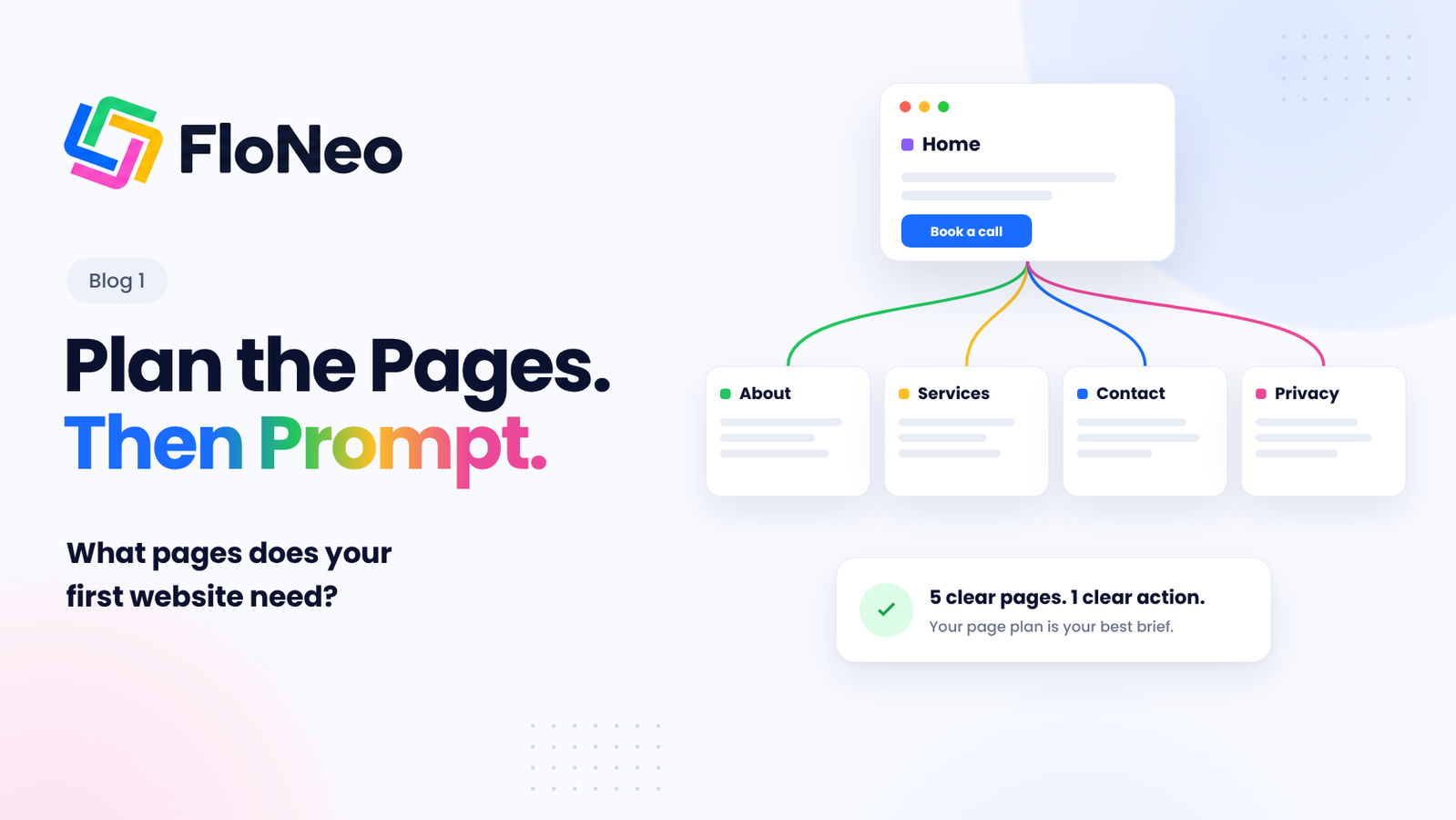
For most freelancers, creators and small businesses, five pages cover the essentials.
| Page | Its job | What it must include |
|---|---|---|
| Home | Explain what you do in seconds and point to the next step | A clear headline, who you help, one primary call to action |
| About | Show there's a real person or business behind the site | Your story, experience, photo or team, why you do this |
| Services / Work | Show what you offer and prove you can do it | Services or products, examples, results, pricing approach |
| Contact | Make it effortless to reach you | Email, phone or WhatsApp, location if relevant, a simple form |
| Privacy policy | Explain how you handle visitors' data | What you collect, why, and how people can reach you about it |
1. Home: Say What You Do, Fast
Your homepage isn't a summary of everything. It's a signpost. A visitor should understand three things almost immediately: what you do, who it's for and what to do next.
Research from Nielsen Norman Group found that many visitors couldn't tell what some organisations actually did from their websites, and recommends a clear explanation of what the company does. [1] That applies even more to a one-person business.
A simple structure works:
- A headline that says what you do, not a slogan.
- One line on who you help.
- A primary button for your main action.
- A short preview of your services or work.
- Proof: a testimonial, client logos or a result.
2. About: Show There's a Real Person Here
People buy from people. Stanford's Web Credibility guidelines recommend showing that real, trustworthy people and a real organisation stand behind a site. [2]
Your About page doesn't need to be long. It needs to be honest: who you are, what you've done, why you do this work and, ideally, a real photo.
3. Services or Work: Prove It
This is where visitors decide whether you can solve their problem. Describe each service in plain language: what's included, who it's for and what the outcome is.
If you're a freelancer or creator, show your work. Three strong examples beat fifteen average ones.
4. Contact: Make It Effortless
Nielsen Norman Group's research on contact pages found that users still expect to see real contact details such as an email address and phone number, rather than having them hidden behind forms or chat. [3]
Keep the form short. Name, email and message are often enough. And test that submissions actually reach you before you launch.
5. Privacy Policy: Required More Often Than You Think
If your site collects personal information, even just a name and email through a contact form, you should explain what you collect and why. Data protection rules apply in many countries, so check what applies to your business.
It's not the most exciting page, but it's part of being trustworthy.
Five clear pages beat fifteen half-finished ones.
Which Extra Pages Do You Need? It Depends on What You Do
Once the essentials are in place, add pages based on your type of business, not on what other websites have.
| If you are... | Consider adding |
|---|---|
| A freelancer | A portfolio or case studies page, a process page ("How I work"), testimonials |
| A creator | A media kit or "Work with me" page, links to your content, a newsletter signup |
| A local business | Location and opening hours, a menu or price list, a booking page |
| An early-stage startup | A product page, an FAQ, a waitlist or signup page |
Pages You Can Skip at Launch
It's tempting to launch with everything. Don't. Every extra page is something you have to write, check and keep up to date.
These can usually wait:
- A blog - start one when you can publish consistently.
- Careers - add it when you're actually hiring.
- A long FAQ - collect real questions from customers first, then answer them.
- Multiple landing pages - start with one strong homepage.
Stanford's credibility guidelines also recommend keeping content current and fixing errors such as broken links. [2] A small site that's accurate and up to date earns more trust than a large one with empty sections.
Turn Your Page Plan Into a Brief
Here's the useful part. Once you know your pages, your AI prompt almost writes itself.
Build a website for [business name], a [what you do] for [who you help].

Primary goal: [contact / book / buy / follow]

Pages:
- Home: headline, who we help, primary call to action, services preview, one testimonial
- About: story, experience, photo
- Services: [list services with one line each]
- Contact: email, phone, short form (name, email, message)
- Privacy policy

Brand: [3 adjectives], colours [colours]
Make every element easy to edit visually after generation.
A brief like this gives an AI builder clear structure to work from. It also means fewer "add a page", "remove that section" and "move this" requests later. For a fuller template, see our guide to building a website with AI without burning through credits. [4]
Where FloNeo Fits
FloNeo follows a simple flow: describe, generate, edit, own. [5]
You describe your website, including the pages you planned above, and FloNeo generates a structured starting interface. From there, you refine it directly on the canvas: change text, spacing, colour, size and position without sending another prompt.
When a change genuinely needs reasoning, such as restructuring a page for a new audience, you can use AI. And before an AI action runs, FloNeo shows you its expected credit cost, so you know what a change will cost before you commit.
Plan the pages. Prompt once. Edit the details yourself.
Your First Website Starts With a Plan
You don't need a big website. You need the right one: a handful of pages that each do one job well, built around one clear action for your visitors.
Decide what visitors should do. Plan five essential pages. Add only what your business needs. Then let AI build the first version, and make it yours.
FloNeo launches on 16 November 2026. Join the free waitlist before 8 November to get early access.
Next in the Series
Part 2: The Real Cost of Building a Website With AI: Credits, Fixes and the Hidden Bill
Part 2 looks at where the cost of an AI-built website actually comes from, and how to budget for it.
Coming later this week.
References
- Nielsen Norman Group. "About Us" Information on Corporate Websites.
- Stanford Persuasive Technology Lab. Stanford Web Credibility Guidelines.
- Nielsen Norman Group. 'Contact Us' Page Guidelines.
- FloNeo. How to Build a Website With AI Without Burning Through Credits (Sample Prompt Included).
- FloNeo. FloNeo - Describe, Generate, Edit, Own.