
FloNeo vs Others: We Tested Database Editing in 5 AI App Builders
One simple database change exposes a big product difference: does the user control the database directly, or does every edit go back through AI?
Aayush4 min read
FloNeo vs Others: We Tested Database Editing in 5 AI App Builders
The database already exists. The user already knows the change. Who still makes them go back through AI?
Part 2 of 3 - The Comparison
In Part 1, Your AI Built the Database. Why Do You Still Need AI to Change It?, we introduced FloNeo's philosophy: AI for creation, UI for management. This article applies that idea to one concrete database-editing scenario.
The use case
A company already has a Customers table with:
- Name
- Phone
The sales team now wants to:
- add a Customer Type field with values such as Enterprise, SMB, or Individual; and
- import or update 2,000 existing customer records from Excel.
The requirement is straightforward.
The interesting question is not whether modern tools can make the change.
It is how the user is expected to make it.
Lovable: AI handles the database change with SQL underneath
With Lovable, the user can describe the change in AI chat:
"Add a Customer Type field to the Customers table."
Lovable then translates that request into the underlying PostgreSQL database change, typically through SQL or migration-style operations.
For larger imports or more sensitive data changes, database tooling or SQL may become relevant, especially where the operation is complex or potentially destructive.
The user does not necessarily need to know SQL.
But AI remains the interface through which the database change is initiated.
| What worked | What held it back |
|---|---|
| Natural language lets users describe database changes without knowing SQL. | Simple changes still require an additional AI request. |
| AI translates the request into underlying database changes. | The underlying operation remains technical. |
| PostgreSQL provides a mature database foundation. | Destructive changes may still require editor or SQL intervention. |
| Migrations provide a controlled way to apply schema changes. | The user has less direct control over routine database edits. |
Base44: AI manages the data model
Base44 approaches the same task through its NoSQL database and entity model.
The user works with entities representing objects such as Customers.
They can ask AI to add Customer Type to the Customer entity and provide the Excel file containing the existing data. AI can help update the structure and map spreadsheet columns to the relevant fields.
The user describes the desired data model.
The platform handles the underlying structure.
| What worked | What held it back |
|---|---|
| Hides complex database terminology. | Users still depend on AI for changes. |
| Entity-based setup is easy to understand. | Less direct control over structure. |
| AI creates and modifies data structures. | Changes are made through prompts rather than direct controls. |
| AI simplifies structured data imports. | Less visibility into the underlying database. |
| Field mapping reduces manual data preparation. |
Emergent: work with the agent
Emergent takes a strongly agent-driven approach.
Instead of telling the system to modify one field, the user can describe the business requirement:
"Add Customer Type to our Customers and update the existing customer data from this spreadsheet."
The agent can reason across the broader application and decide what needs to change in the database, backend, relationships, or interface.
That is useful when the requirement genuinely spans multiple parts of the application.
For a simple, already-decided database edit, however, it keeps the agent in the loop.
| What worked | What held it back |
|---|---|
| Users can describe the requirement in business language. | Simple changes still require an AI agent. |
| The agent can reason across the whole application. | Straightforward changes can become overcomplicated. |
| It can coordinate database, backend, and frontend changes. | Less direct control over individual database operations. |
| Useful for changes that affect connected parts. | More reasoning means more overhead for simple edits. |
Replit Agent: AI plus direct database access
Replit gives users two routes.
They can ask Replit Agent to make the database change, or they can use more developer-oriented database tooling to inspect and modify data directly.
For the example, the user could ask the Agent to add Customer Type and process the Excel data.
Alternatively, once the database exists, tools such as Drizzle Studio can provide a visual way to browse and modify the database.
That makes Replit one of the closer examples of combining AI-driven development with direct database access.
The trade-off is technical depth.
| What worked | What held it back |
|---|---|
| AI can handle database changes. | More developer-oriented overall. |
| Visual tools provide direct database access. | Direct access exposes more technical concepts. |
| Users can inspect and edit actual records. | May feel excessive for a simple business edit. |
| AI and developer tools can work side by side. | Less suited to non-technical users who want only the task. |
| Strong control for technical users. | More setup and complexity than the use case requires. |
Kimi Websites: AI creation with a visual data panel
Kimi Websites also combines AI-generated applications with a visual data interface.
AI can create the backend database, while the database panel can support basic record operations such as viewing, editing, and deleting data.
In our example, AI can help create the Customer structure while the visual panel gives the user some direct control over the resulting records.
That reduces the need for repeated AI prompts for basic data management.
| What worked | What held it back |
|---|---|
| AI can create the backend database. | Visual control is limited to basic operations. |
| A visual panel gives direct access to records. | Complex structural changes may still require AI or technical help. |
| Users can view, edit, and delete records. | Less control than a full database-management tool. |
| Reduces the need for SQL. |
FloNeo: the database becomes part of the visual builder
FloNeo starts from a different interaction model.
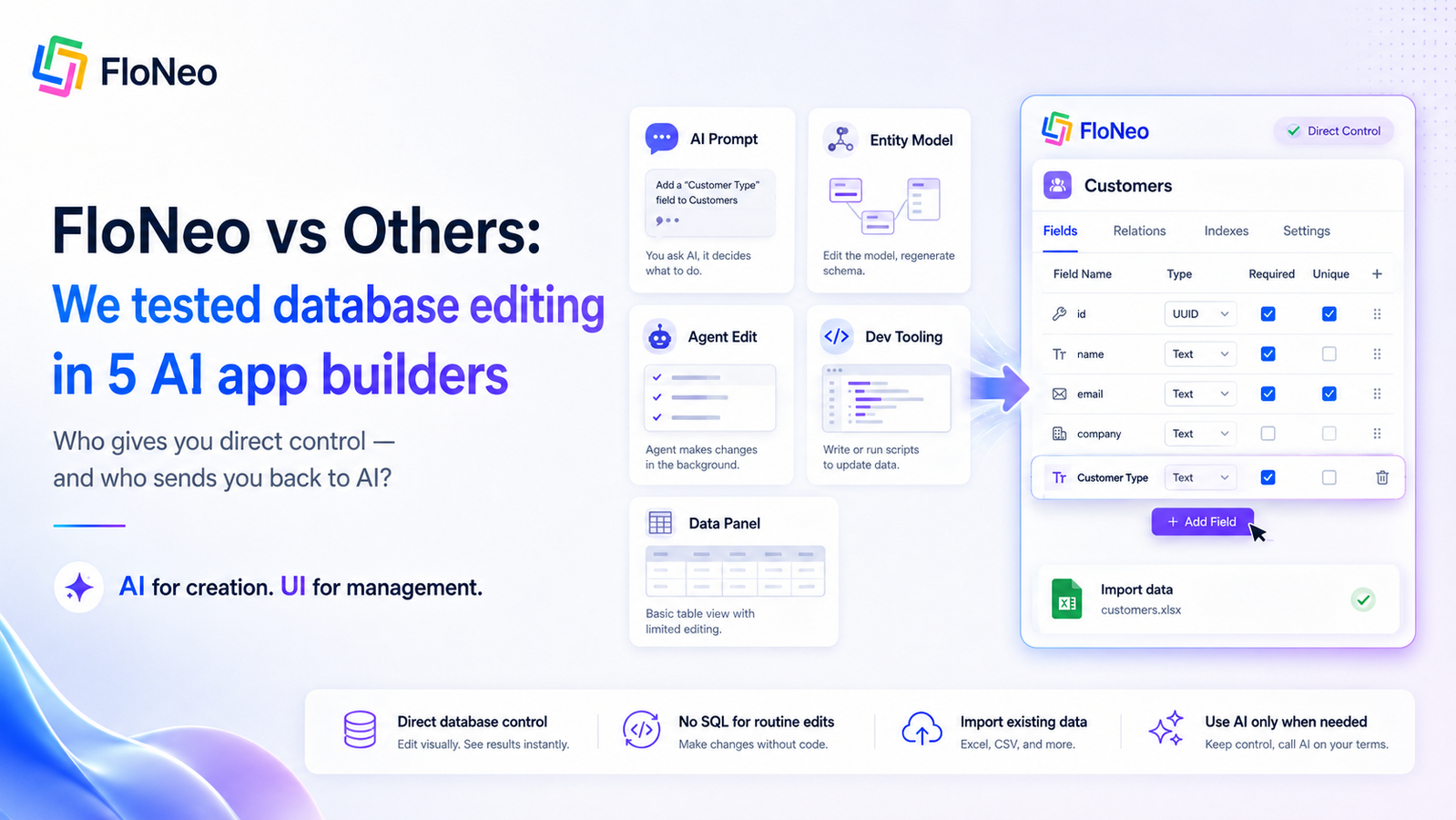
If the user already knows they want a Customer Type field, there is no need to ask AI to decide or interpret that request.
They can:
- open the Customers table;
- select Add Field;
- enter Customer Type;
- save.
For the 2,000 existing customers, the data can be imported directly through the database-management flow rather than making an AI agent reason through an already-defined operation.
The database is treated as a visual, manageable part of the application - not something that remains hidden behind SQL, migrations, or a conversation with AI.
What works
- direct visual creation of tables and fields;
- no SQL required for normal database operations;
- existing data can be imported;
- the user retains direct control over the database;
- AI remains available when actual reasoning is required.
The real difference is the interface to the database
The difference is not that FloNeo removes the database technology underneath.
Every real application still needs data structures, validation, storage, relationships, and technical safeguards.
The difference is who controls the interaction.
With an AI-first approach:
"Tell the AI what database change you want."
With FloNeo:
"If you already know what you want, make the change directly."
That is the practical expression of LTNC - Low Token No Code.
Use AI when you need intelligence.
Use the UI when you already know what to do.
One scenario, six different interaction models
| Platform | Main interaction for this use case | Direct routine database control |
|---|---|---|
| Lovable | AI chat + underlying PostgreSQL changes | Limited / technical tooling for deeper changes |
| Base44 | AI-driven entity modification | AI remains central |
| Emergent | Agent reasons across the application | Agent remains central |
| Replit Agent | AI or developer-oriented direct tooling | Strong, but more technical |
| Kimi Websites | AI creation + visual record panel | Basic visual control |
| FloNeo | Visual database builder for known edits; AI when reasoning is needed | Core product philosophy |
This comparison is not about declaring one workflow universally better.
Different users need different levels of abstraction.
FloNeo's bet is specific:
When the user already knows the database change, control should not be hidden behind another prompt.
Next in the series
Part 3: Easy to Build, Easier to Change: 5 Real-Life Database Examples with FloNeo
We move beyond the Customers table and apply the same philosophy to healthcare, manufacturing, HR, retail, and a startup whose data model keeps changing.
Internal-link note: Add the live Part 1 and Part 3 URLs after publication. Do not publish guessed URLs.
References & Further Reading
- Source draft: Database Management with Floneo - Blogs Set, Blog 2.
- Series context: Your AI Built the Database. Why Do You Still Need AI to Change It? - add the live URL after Part 1 is published.
- FloNeo: How FloNeo's 4-Layer Architecture Makes AI Prototyping Ultra-Affordable.